How do I make a Markdown cell in Jupyter Notebook?
Select the cell, press Esc, then press M. You can also use the cell type dropdown and choose Markdown.
Copyable Markdown examples for Jupyter Notebook cells, LaTeX equations, tables, images, HTML, and data science notes
Jupyter supports standard Markdown plus LaTeX math and HTML. See our Markdown Cheat Sheet for basic syntax.
Use double dollar signs for centered equations in Markdown cells.
## Model accuracy

The final score is calculated with:

$$
accuracy = \frac{correct}{total}
$$Markdown tables render well in Jupyter for quick experiment summaries.
| Model | Accuracy | Notes |
| --- | ---: | --- |
| Baseline | 82% | Logistic regression |
| Tuned | 91% | Random forest |
Keep image files next to the notebook or use a relative path from the notebook location.
 *Figure 1. Validation confusion matrix.*
Building a results table? Open any Markdown table in the visual editor — edit cells, sort columns, export to CSV, Excel or LaTeX.
Open the table generatorSection titles — use one # per level
# H1
## H2
### H3
#### H4
Double asterisks
**bold text**
Single asterisks or underscores
*italic text*
Triple asterisks
***bold and italic***
Double tildes
~~struck through~~
Greater-than sign at line start
> Quoted note or citation
Divider between sections
---
Dash or asterisk, indent to nest
- Item one
- Item two
  - Nested item
Ordered steps
1. First step
2. Second step
3. Third step
Checkboxes (JupyterLab & modern renderers)
- [x] Clean data
- [ ] Train model
Inline hyperlink
[Jupyter docs](https://jupyter.org)
Relative path from the notebook file

Remote image

Image embedded via drag-and-drop into the cell

Pipes and a dashed separator row
| Column A | Column B |
| --- | --- |
| value 1 | value 2 |
Colons control column alignment
| Left | Center | Right |
| :--- | :---: | ---: |
| a | b | c |
Single backticks inside a sentence
Call `df.head()` to preview
Syntax-highlighted, not executed
```python
import pandas as pd
df = pd.read_csv("data.csv")
```No highlighting, keeps spacing
```
raw output or logs
```
Inline equations
$E = mc^2$
Centered equations
$$\sum_{i=1}^{n} x_i$$Fraction notation
$\frac{a}{b}$Greek symbols
$\alpha, \beta, \gamma, \theta$
Sub and super
$x_i^2$ or $x_{i+1}^{n-1}$Roots
$\sqrt{x}$ or $\sqrt[n]{x}$Custom colors
<span style="color:red">Red text</span>
Center alignment
<center>Centered text</center>
Sized images
<img src="img.png" width="300"/>
Force line break
<br>
Link to heading
[Link to section](#section-name)
Info boxes
<div class="alert alert-info">Info message</div>
Expandable section
<details><summary>Title</summary>Hidden content</details>
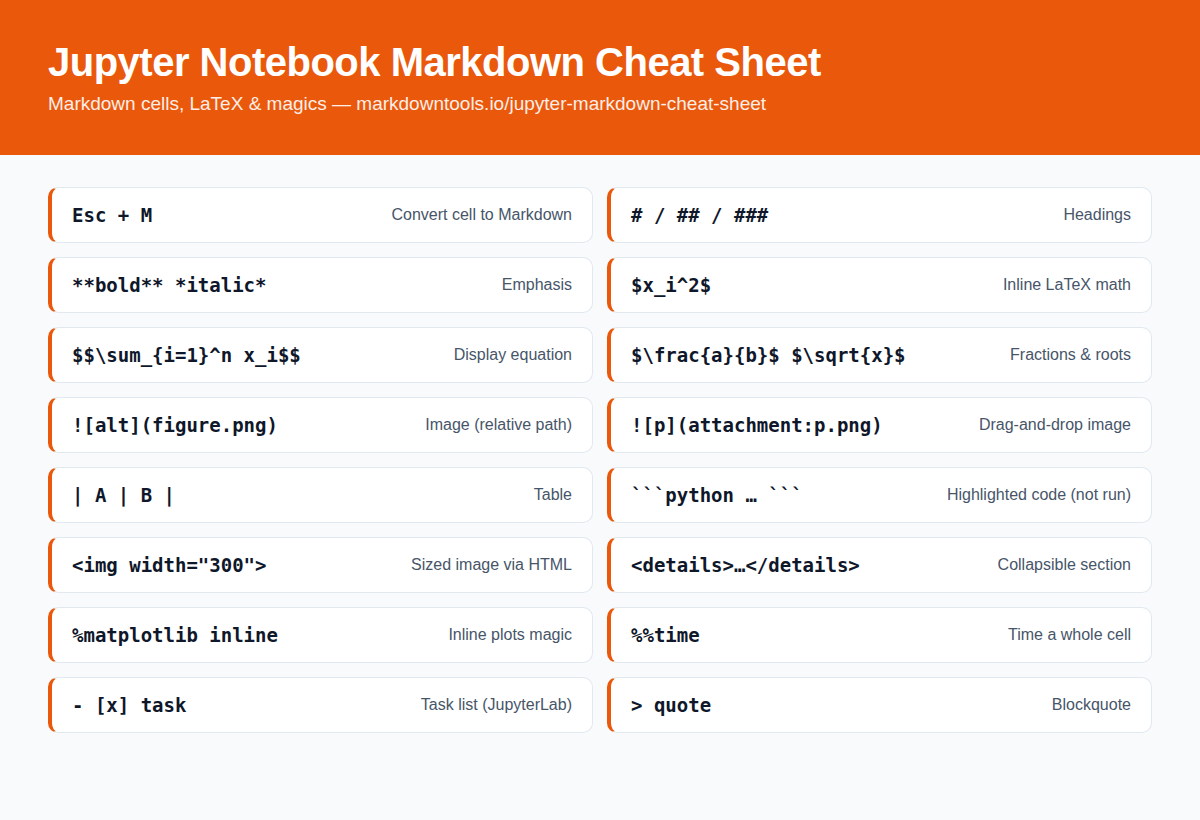
%matplotlib inlineDisplay plots inline%load_ext autoreloadEnable autoreload extension%timeitTime a single statement%%timeTime entire cell%%writefile filenameWrite cell to file%%bashRun cell as bash script%%htmlRender cell as HTML%%latexRender cell as LaTeXPrefer a picture? Save or share the Jupyter Notebook Markdown cheat sheet as a single image — handy for pinning in team chats, wikis, and study notes.
 Download image (PNG)
Esc + MConvert cell to MarkdownEsc + YConvert cell to CodeShift + EnterRun cell and select belowCtrl + EnterRun cellEsc + AInsert cell aboveEsc + BInsert cell belowEsc + D, DDelete cellSelect the cell, press Esc, then press M. You can also use the cell type dropdown and choose Markdown.
Yes. Use single dollar signs for inline math and double dollar signs for display equations. Jupyter renders them with MathJax.
Yes, many HTML tags work inside Markdown cells, including span, div, img, details, and simple inline styles.
Use standard Markdown image syntax:  with a path relative to the notebook file, or a full URL. You can also drag an image into the cell (attachment:image.png) or use an HTML img tag to control the width.
Use pipe syntax: put column names in the first row, a separator row of dashes (| --- | --- |) beneath it, then one row per line. Add colons to the separator row to align columns left, center, or right.
Yes — click the Download PDF button at the top of this page to get the full cheat sheet as a free PDF file, including the LaTeX, table, and magic command references. No signup required.
No. Fenced code blocks in Markdown cells are display-only with syntax highlighting. To execute code, put it in a code cell instead.