What is Obsidian?
Obsidian is a powerful knowledge base and note-taking application that stores Markdown files locally on your device, with features like wikilinks, graph view, and extensive plugins.
Every Obsidian syntax with a copy button — wikilinks, callouts, embeds, tags, LaTeX, Mermaid — plus a free PDF and a vault-ready .md download
Updated July 2026 — every section verified against the official Obsidian Help
Or grab the file directly: obsidian-markdown-cheat-sheet.md
Obsidian supports all standard Markdown syntax plus the extensions below. See our Markdown Cheat Sheet for standard syntax.
Obsidian fully supports standard Markdown — headings, bold, and italic work exactly as they do in CommonMark.
Up to six levels; the number of # symbols sets the level shown in the outline.
# Heading 1
## Heading 2
### Heading 3
Double asterisks; double underscores (__text__) also work.
**bold text**
Single asterisks; single underscores (_text_) also work.
*italic text*
Source: Obsidian Help · Last verified 2026-07-18
Wikilinks connect notes by name inside double brackets — no file path required. Obsidian can update them automatically when you rename a note.
Link to another note
[[Page Name]]
Link with custom display text
[[Page Name|Display Text]]
Link to a specific heading; add more # symbols for subheadings
[[Page Name#Heading]]
Link to a specific block; type ^ after # to pick from suggestions
[[Page Name#^block-id]]
Source: Obsidian Help · Last verified 2026-07-18
Both formats link between notes and render identically. Wikilinks are the default; disable "Use [[Wikilinks]]" under Settings → Files and Links for maximum interoperability.
Compact and vault-native; autocompletes when you type [[
[[Three laws of motion]]
Portable to other Markdown tools; URL-encode spaces as %20
[Three laws of motion](Three%20laws%20of%20motion.md)
Source: Obsidian Help · Last verified 2026-07-18
Prefix any internal link with ! to embed the content inline instead of linking to it.
Embed an entire note
![[Note Name]]
Embed a specific section of another note
![[Note#Heading]]
Embed a vault image; |100 sets the width, |640x480 sets width and height
![[image.png|100]]
Embed a PDF; #page=N opens a specific page, #height=400 sets the viewer height
![[document.pdf#page=3]]
Source: Obsidian Help · Last verified 2026-07-18
Add [!type] to the first line of a blockquote. Thirteen built-in types with aliases; an unknown type falls back to note.
Information callout — the fallback for unknown types
> [!note]
> Content here
Aliases: hint, important
> [!tip]
> Content here
Aliases: caution, attention
> [!warning]
> Content here
Aliases: help, faq
> [!question]
> Content here
A minus collapses the callout by default; a plus expands it
> [!note]- Title
> Hidden content
Source: Obsidian Help · Last verified 2026-07-18
YAML between --- lines at the very top of a note. Property types: text, list, number, checkbox, date, date & time. Default properties: tags, aliases, cssclasses.
Note metadata; tags in YAML must be formatted as a list
---
title: My Note
tags:
  - project
  - draft
---
Alternative note names for linking and search, one per line
aliases:
  - Project kickoff
Source: Obsidian Help · Last verified 2026-07-18
Tags are clickable keywords. Add them inline with a # prefix or via the tags property.
Click a tag to search for it across the vault
#project
Slashes create a hierarchy; searching tag:inbox also matches nested tags
#inbox/to-read
Source: Obsidian Help · Last verified 2026-07-18
Marker-style highlight; an Obsidian extension, not standard Markdown
==highlighted text==
Source: Obsidian Help · Last verified 2026-07-18
A GitHub Flavored Markdown extension, fully supported in Obsidian
~~strikethrough~~
Source: Obsidian Help · Last verified 2026-07-18
Text wrapped in %% is only visible in Editing view — it disappears in Reading view and on published sites.
Hide part of a line
This stays visible %%this is hidden%% in the note.
Hide whole paragraphs
%%
Draft notes here.
Block comments span multiple lines.
%%
Source: Obsidian Help · Last verified 2026-07-18
Named footnotes like [^note] also work; they still render as numbers
A sentence with a note.[^1]

[^1]: The referenced text.
Caret goes outside the brackets; works in Reading view only, not in Live Preview
An inline footnote.^[The note text goes here.]
Source: Obsidian Help · Last verified 2026-07-18
Cells need no alignment, but the header separator must contain at least two hyphens
| First name | Last name |
| --- | --- |
| Max | Planck |
Colons in the separator row set left, center, or right alignment
| Left | Center | Right |
| :-- | :--: | --: |
| a | b | c |
Source: Obsidian Help · Last verified 2026-07-18
Math expressions render with MathJax using LaTeX notation.
Single dollar signs render math within a sentence
$e^{2i\pi} = 1$Double dollar signs on their own lines render a display block
$$
\sum_{i=1}^n x_i = \frac{n(n+1)}{2}
$$
Source: Obsidian Help · Last verified 2026-07-18
A mermaid code block renders as a diagram — flowcharts, sequence diagrams, timelines, and more.
Rendered as a diagram in Reading view and Live Preview
```mermaid
graph TD
  Biology --> Chemistry
```
One of many Mermaid diagram types Obsidian supports natively
```mermaid
sequenceDiagram
  Alice->>John: Hello John
  John-->>Alice: Hi Alice
```
Source: Obsidian Help · Last verified 2026-07-18
Obsidian supports CommonMark, GitHub Flavored Markdown, and LaTeX math — with a few deliberate exceptions worth knowing before you port notes.
Obsidian intentionally does not render Markdown syntax inside HTML elements
<div>
This **will not** be bold.
</div>
Block reference links only resolve inside Obsidian; they break in other Markdown tools
[[Note#^block-id]]
No Markdown syntax exists for underline; raw HTML works, but Markdown inside HTML is not processed
<u>underlined text</u>
Source: Obsidian Help · Last verified 2026-07-18
How Obsidian extends standard Markdown (CommonMark + GitHub Flavored Markdown), verified against the official Obsidian Help on 2026-07-18. For the standard syntax, see our Markdown Cheat Sheet.
| Feature | Syntax | Standard Markdown | Obsidian | Notes |
|---|---|---|---|---|
| Headings, bold, italic | # H1, **bold**, *italic* | yes | yes | Core CommonMark syntax, identical in Obsidian. |
| Strikethrough | ~~text~~ | partial | yes | GFM extension, not part of CommonMark. |
| Highlight | ==text== | no | yes | Obsidian extension; shows as literal == elsewhere. |
| Tables | | A | B | | partial | yes | GFM extension; Obsidian adds Live Preview table editing. |
| Task lists | - [x] done | partial | yes | GFM extension; any character inside the brackets marks a task complete in Obsidian. |
| Footnotes | [^1] | partial | yes | GFM extension; inline ^[...] footnotes are Obsidian-only. |
| Tags | #tag | no | yes | Renders as a plain heading-less #word elsewhere; searchable metadata in Obsidian. |
| Wikilinks | [[Note]] | no | yes | Obsidian-only; renders as literal brackets in CommonMark/GFM. |
| Embeds | ![[Note]] | no | yes | Obsidian-only transclusion syntax. |
| Callouts | > [!note] | partial | yes | GitHub alerts support five fixed types; Obsidian adds 13 types, aliases, folding, and nesting. |
| Comments | %%hidden%% | no | yes | Visible as literal text outside Obsidian; hidden in Obsidian Reading view. |
| Math | $x^2$ | no | yes | Not in CommonMark or GFM core; Obsidian renders via MathJax. |
| Mermaid diagrams | ```mermaid | partial | yes | GitHub.com also renders mermaid blocks; plain CommonMark/GFM treat them as code. |
| Properties (frontmatter) | ---
key: value
--- | no | yes | Not parsed by CommonMark/GFM; Obsidian turns the YAML block into typed note properties. |
| Markdown inside HTML | <div>**text**</div> | partial | no | Obsidian deliberately skips Markdown inside HTML elements; CommonMark processes inline Markdown around HTML. |
Use frontmatter, internal links, and headings together for durable meeting notes.
---
tags: [meeting, roadmap]
---

# Product sync

Related: [[Roadmap]] and [[Launch checklist]]

## Decisions
- Ship the beta on Friday
- Follow up with [[Design review]]
Add a minus sign after the callout type to collapse long reference blocks by default.
> [!summary]- Research notes
> Key source: [[Competitor audit]]
> Next step: compare pricing pages.
Embed a specific heading when you only need one section from another note.
![[Project plan#Risks]]

See also: [[Project plan#Timeline]]
Download the whole reference as a real PDF file — every wikilink, callout, embed, and Mermaid example on one clean sheet. Prefer to work inside Obsidian? Download the same reference as a vault-ready Markdown note, or copy it in one click — the page, PDF, and .md are generated from a single verified source. Prefer paper? Print the page directly and the layout hides navigation and buttons automatically. You can also copy any example into the Markdown to PDF converter for a custom version.
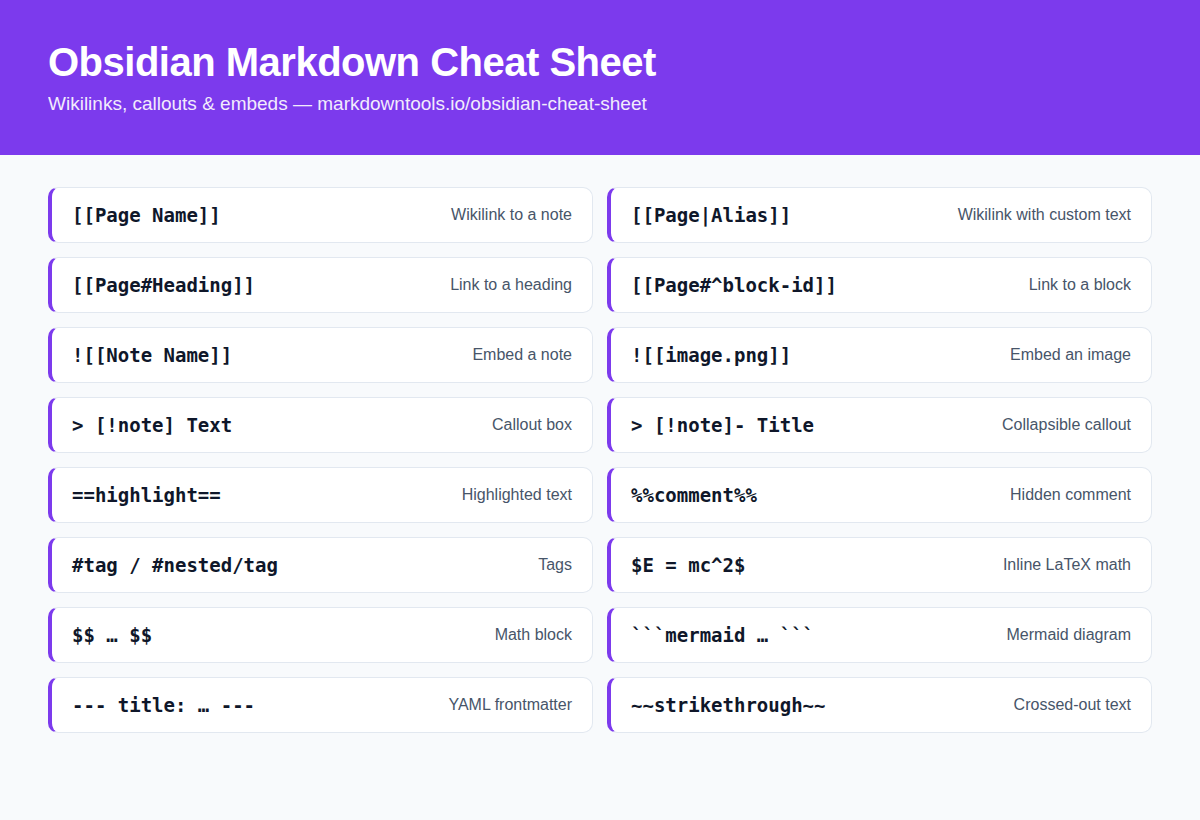
Prefer a picture? Save or share the Obsidian Markdown cheat sheet as a single image — handy for pinning in team chats, wikis, and study notes.
 Download image (PNG)
Cmd/Ctrl + NNew noteCmd/Ctrl + OOpen quick switcherCmd/Ctrl + PCommand paletteCmd/Ctrl + EToggle edit/previewCmd/Ctrl + ClickOpen link in new pane[[Start wikilinkObsidian is a powerful knowledge base and note-taking application that stores Markdown files locally on your device, with features like wikilinks, graph view, and extensive plugins.
Wikilinks use double brackets [[like this]] and automatically link to other notes in your vault by name, without needing the full file path.
Yes! Obsidian supports all standard Markdown syntax plus its own extensions like wikilinks, callouts, and embeds.
Yes — click the Download PDF button to get the free Obsidian Markdown cheat sheet as a real PDF file, ready to save or print. No signup or email required. You can also print the page directly with Ctrl/Cmd+P.
Start with wikilinks, headings, tags, callouts, and embeds. Those five patterns cover most Obsidian vault workflows before you add plugins or advanced templates.